Heatmap Helper - Swift SDK
This example show how to aggregate point features into a heatmap. Control style options like weight, radius, intensity, opacity, and optionally use a color ramp.
The vector layer helpers take your data and styling options and create the right source + layers on the current map style with minimal code. Helpers normalize sensible defaults like zoom range, outlines, etc. so you can get results quickly.
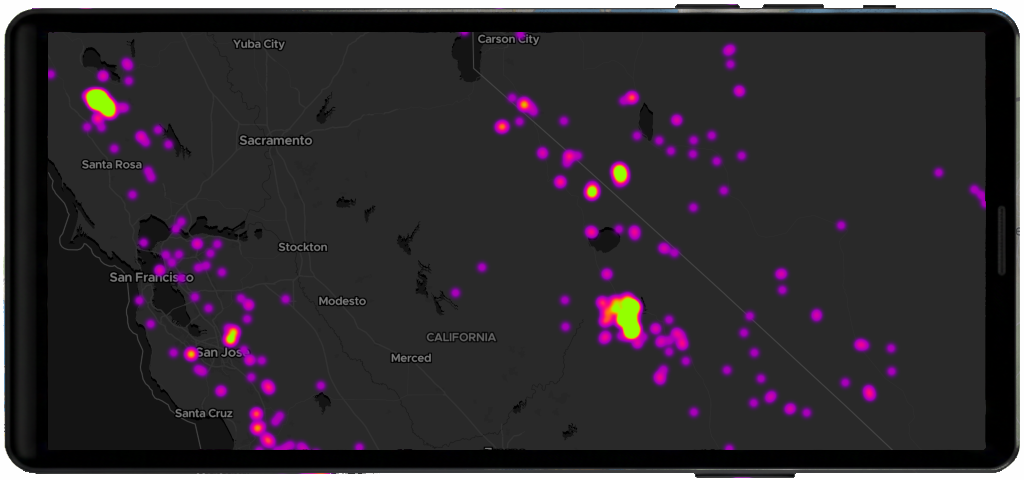
Basic flow
import MapTilerSDK

// Assume you have an MTMapView already on screen
let mapView: MTMapView = ...

Task { @MainActor in
    guard let style = mapView.style else { return }

    let helper = MTHeatmapLayerHelper(style)

    let options = MTHeatmapLayerOptions(
        data: "https://docs.maptiler.com/sdk-js/assets/earthquakes.geojson",
        property: "mag", // use a property for weighting (optional)
        weight: 1.0,
        radius: 20.0,
        intensity: 1.0,
        opacity: 0.8
    )

    await helper.addHeatmap(options, colorRamp: nil, in: mapView)
}
Create a hetmap using a color ramp
import MapTilerSDK

// Assume you have an MTMapView already on screen
let mapView: MTMapView = ...

Task { @MainActor in
    guard let style = mapView.style else { return }

    let helper = MTHeatmapLayerHelper(style)

    let ramp = MTColorRamp(
        stops: [
            .init(zoom: 0, value: "#2DC4B2"),
            .init(zoom: 5, value: "#3BB3C3"),
            .init(zoom: 8, value: "#669EC4"),
            .init(zoom: 11, value: "#8B88B6"),
            .init(zoom: 14, value: "#A2719B")
        ]
    )

    let options = MTHeatmapLayerOptions(
        data: "https://docs.maptiler.com/sdk-js/assets/earthquakes.geojson",
        property: "mag",
        radius: 20
    )

    await helper.addHeatmap(options, colorRamp: ramp, in: mapView)
}
Learn more
Check the MTHeatmapLayerHelper reference to understand how to create and manage point layers.
Review MTHeatmapLayerOptions to explore all available configuration options.
Related examples


On this page